
If you are new to SEO, you may wonder, “What is site architecture in SEO?”. To put it simply: site architecture is a blueprint that determines how your pages are structured and how information is organized across the entire domain. At its core, site architecture establishes a hierarchy. Your homepage sits at the top; your main category or service pages branch off from there; and then deeper pages, like blog posts or individual service detail pages, sit further down.
A well-designed site architecture does three things really well.
- It makes it easy for people to find what they are looking for
- It makes it easy for search engine crawlers to discover and index your pages
- It reinforces the topical authority and relevance of your content, helping search engines understand what your site is actually about.
A bad site architecture does the opposite. Pages get buried. Crawlers can’t find them. Users bounce. Simple as that.
Why Site Architecture Matters for SEO
Based on my experience running SEO campaigns for managed service providers (MSPs), I have seen websites with incredible content rank poorly because their site structure was sloppy. I have also seen websites with mediocre content outperform competitors by leveraging a tight site architecture that makes it easy for search engines to crawl, index, and understand the relationships between pages. Site architecture is a foundation for technical SEO. Before you launch into a content plan, you should have a high-level map of your website’s site architecture.
Here are the three main benefits of sound website architecture:
1. Improve crawlability
2. Optimize link equity distribution
3. Enhance user experience
Crawlability and How Search Engines Navigate Your Site
Before a search engine can rank any of your pages, it has to find them first, and it does that by sending crawlers through your site following links from one page to another. Your site architecture acts as a roadmap for those crawlers. If you have a clean, shallow site hierarchy where important pages are only a few clicks from the homepage (ideally less than 3), crawlers will find and index those pages quickly and efficiently.
But if your pages are buried five or six clicks deep inside a messy structure with no clear paths between them? Those pages might never get crawled at all. I have run site audits for clients in which we discovered dozens of important service pages that were orphaned (more on that below), and as a result, they’ve never appeared in Google.
Internal Linking and Link Equity Distribution
Internal linking is one of the most powerful tools you have as an SEO, and it is directly tied to your site architecture. When one page on your site links to another, it passes link equity, sometimes called link juice or page rank, which is essentially a signal to search engines that the linked page has value and authority.
The way your internal links are structured determines how that equity flows across your site. If your architecture is set up so that your most important pages receive internal links from multiple high-authority pages on your site, those pages are going to rank better. Period. But if your internal linking is random or nonexistent, that equity just leaks out and your key pages never get the boost they need.
User Experience and Site Navigation
Poor site architecture creates friction for users. It’s confusing for them to navigate, which can lead to a higher bounce rate (the % of users who land on your site and don’t take further action).
Search engines want to serve up sites that are well-organized and easy to navigate. When your site’s pages are organized into logical groups with clear navigation, descriptive labels, and intuitive paths from one page to the next, users stay longer, they engage more, and they convert at higher rates. That engagement data feeds back into how search engines rank your site.
Author Note: In Google’s DOJ trial in 2023, user engagement within search results was highlighted as a main ranking factor
Types of Website Architecture
Not every website should be structured the same way, and one of the biggest mistakes I see is people applying a one-size-fits-all approach to their site structure without thinking about what actually makes sense for their specific business and content. There are several common types of website architecture, each with its own strengths and use cases.
Here’s a breakdown of each.
Hierarchical (Tree) Site Structure
The hierarchical structure is by far the most common type of website architecture and it is the one I recommend for the vast majority of B2B sites. It works like a tree. Your homepage is the trunk, your main categories branch off from there, and subcategories and individual pages branch off further as you go deeper.
For example, an MSP website might have a homepage that links to top-level service pages like Managed IT, Cybersecurity, and Cloud Services, and then each of those branches into more specific pages like Network Monitoring, Endpoint Protection, or Cloud Migration. The URL structure mirrors this hierarchy, something like /services/cybersecurity/endpoint-protection/, which gives search engines a crystal clear signal about how your content is organized and how pages relate to each other.
This is the structure I default to for almost every client engagement. It is intuitive, it scales well, and it is the most SEO-friendly option for most use cases.
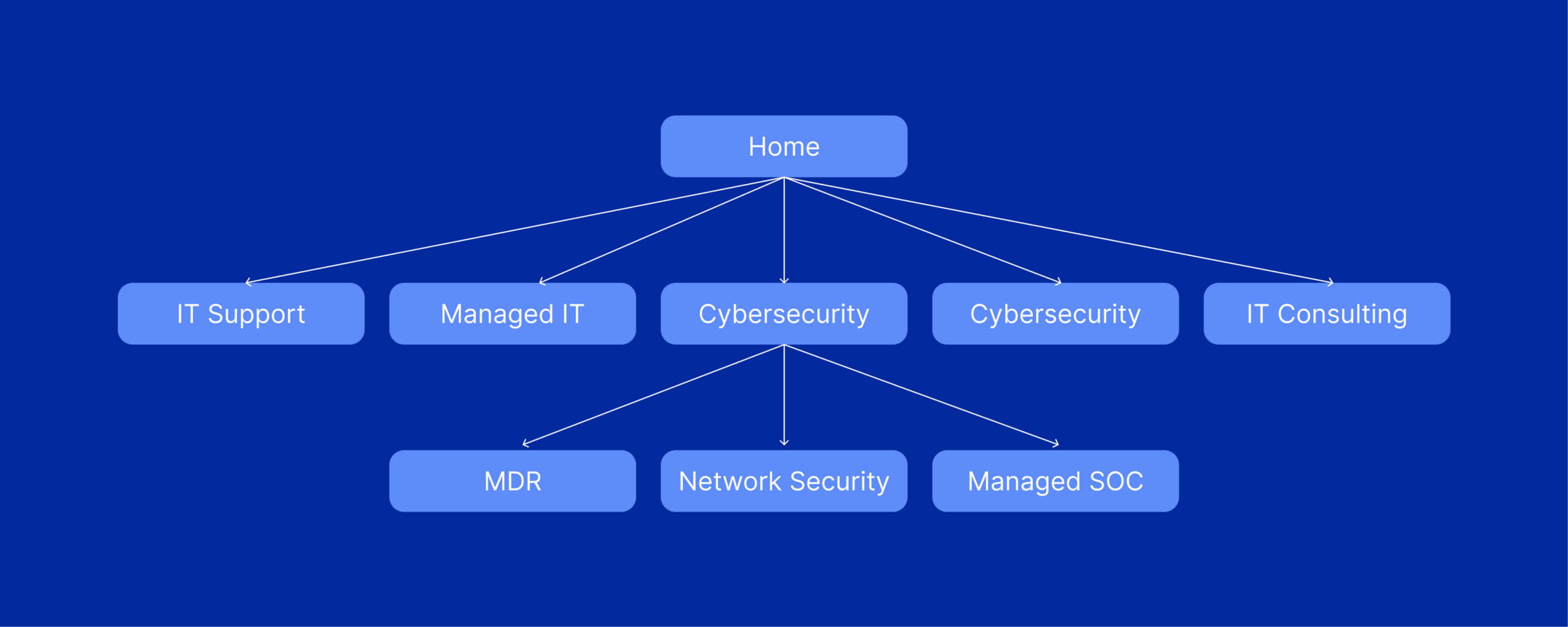
Content Silos Within a Hierarchical Site Structure
Building on hierarchical principles, content silos take things a step further by organizing your site into distinct thematic buckets where everything related to a particular topic, whether it is a service page or a blog post or an FAQ, lives together in the same subfolder and is linked together internally.
I have seen this approach work incredibly well for building topical authority. When search engines see that you have a whole cluster of interlinked pages all covering different angles of the same topic, they start to view your site as an authority on that subject. The result is that not just your pillar page ranks, but the supporting pages start ranking for long-tail keywords too.
One thing I will caution against though is being too rigid with your silos. If you never link between silos, you create dead ends for users and you restrict how link equity flows around the site. As a best practice within our agency I recommend our SEOs cross-link between silos where it is contextually relevant.
Sequential Site Structure
A sequential structure is a straightforward page-to-page path where users move through content in a specific order, page A leads to page B which leads to page C. You see this most commonly in checkout flows on ecommerce sites, onboarding sequences, or multi-step tutorials.
For most B2B websites this is not going to be your primary architecture, but it can be incredibly useful for specific sections of your site like a guided assessment tool or a multi-step contact form. The key thing to understand is that sequential structures are goal-driven, they exist to walk someone through a specific process and nothing more.
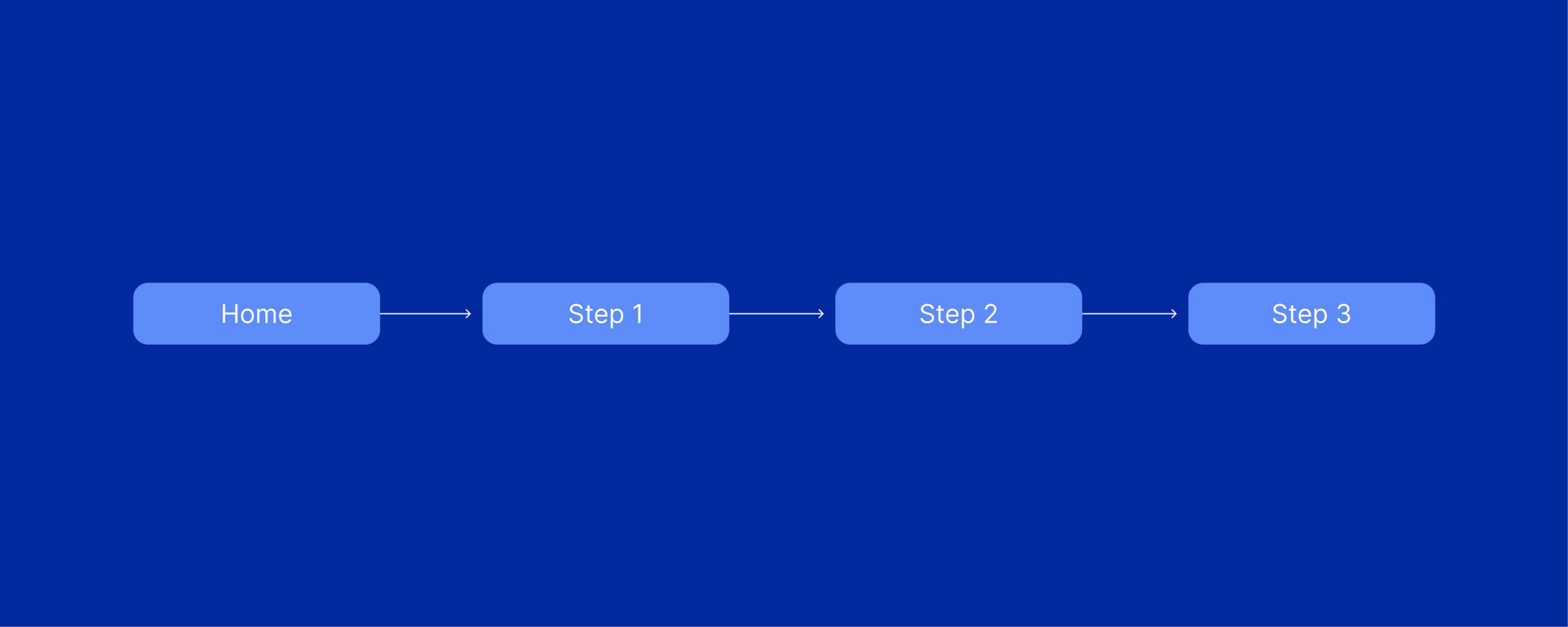
Matrix Site Structure
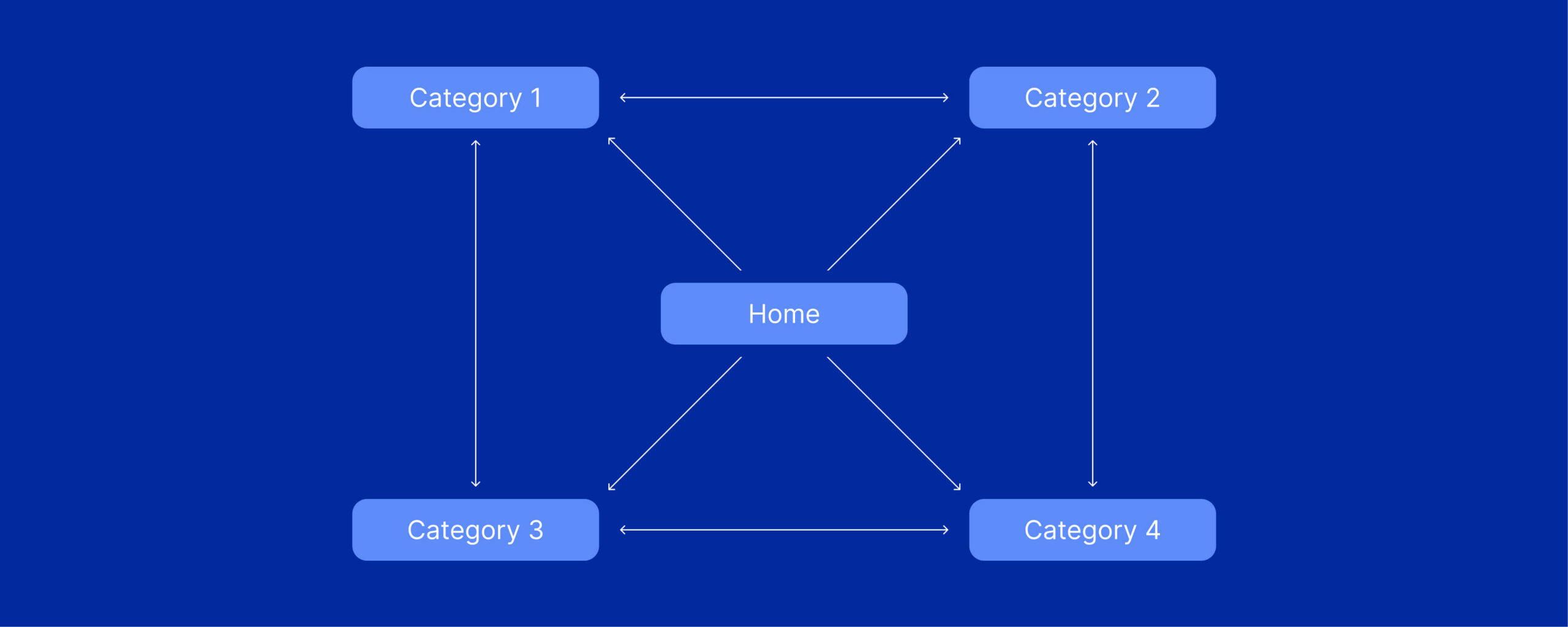
A matrix structure, sometimes called a web-linked or network structure, ditches the traditional URL hierarchy and instead relies almost entirely on internal linking to create connections between content. Wikipedia is the classic example here. There are no real subfolders or categories in the URL structure, just a massive web of interlinked pages. This can work well for knowledge bases, wikis, and resource-heavy publishing sites with a narrow focus where users need to explore freely and the content does not fit neatly into categories.
Database Site Structure
A database structure is a dynamic site architecture where pages are generated from a database based on user inputs, filters, or search queries. Think about sites like Amazon or Pinterest, these platforms are dynamically generating pages from massive databases of information and the structure of the site adapts based on what the user is looking for.
Core Components of SEO-Friendly Site Architecture
Regardless of which type of architecture you choose, there are a handful of components that every SEO-friendly site needs to get right. These are the building blocks that make your site structure actually work for both users and search engines.
URL Structure
Your URL structure is one of the most visible elements of your site architecture and it sends direct signals to search engines about how your content is organized. Based on my experience, the best approach is to keep your website URLs short, descriptive, and reflective of your site hierarchy.
There are two main schools of thought with URL structures: flat architecture and hierarchical (nested) architecture.
Hierarchical (Nested) URL Structure
A hierarchical architecture organizes content into categories and subcategories, reflected directly in the URL. Such as….
- domain.com/it-services
- domain.com/ohio/it-services
- domain.com/ohio/cincinnati/it-services
- domain.com/ohio/cincinnati/it-services-pricing-in-cincinnati
Flat URL Structure
A flat architecture keeps URLs short and close to the root domain, with minimal or no folder depth. Such as…
- domain.com/it-services
- domain.com/ohio-it-services
- domain.com/cincinnati-it-services
- domain.com/it-services-pricing-in-cincinnati
Which URL Structure is best
Most SEOs prefer a nested URL architecture as it’s easier to organize pages on the backend. However, I personally prefer the flat URL structure. It gives the SEO more flexibility down the road with moving pages around from an internal-linking perspective.
Site Navigation and Your Navigation Menu
Your navigation menu is the single most important navigational element on your website. It plays a crucial role in communicating to both searchers and crawlers how your site is structured and which pages are most important.
It’s best if you keep your navigation menu clean and focused. Include your core service or product pages, your most important conversion pages, and maybe a link to your blog or resources section. That is it. If your navigation has 40 links in a mega menu, you are diluting the link equity and making it harder for users to figure out where to go.
Internal Linking
Internal links act as the pathways that distribute link equity across your site. They guide both search engine crawlers and users, helping them discover new pages and navigate to related content.
Types of Internal Linking
There are six different types of internal linking you can use within your site:
- Related product (“people also bought”) modules: These connect product pages to each other, helping users discover similar items while distributing link equity across products.
- Secondary navigation menus: These highlight key collections like sales or bestsellers, creating additional internal pathways beyond the main navigation.
- Contextual links in descriptions: These are embedded within category or product copy to guide users to relevant pages based on content context (most common type of internal links).
- Promotional links (promo tiles): These are visually placed links across the site that direct users to priority pages or campaigns.
- Related search modules: These appear in search results and link users to relevant category pages based on their query behavior.
- Faceted navigation links: These allow users to filter content (such as by size or category) and link to structured landing pages that support discoverability.
High-Level Internal Linking Strategy
Whether you’re focused on B2B local SEO or using content to drive growth for a product-led SaaS, here’s a simple internal linking strategy to follow.
- Link from high-authority pages (pages that have backlinks or organic traffic) to “money pages” that need a ranking boost.
- Use descriptive, keyword-rich anchor text so search engines understand what the linked page is about.
- Connect hub or pillar pages to their supporting content and link the supporting content back to the hub.
- Regularly audit your internal links using a tool like Screaming Frog or Semrush to identify orphan pages with no internal links pointing to them.
How to Organize Your Website for Better SEO
So you understand what site architecture is, the different types of website architecture, and the core components. Now the question is, how do you actually organize your website to put all of this into practice? Here a high-level process you can follow:
Step 1: Run a Site Audit
Before you change anything, you need to understand what you are working with. Run a comprehensive site audit using a tool like Screaming Frog, Semrush, or Ahrefs to get a complete picture of your current site structure. You want to identify orphan pages, broken internal links, pages buried too deep in the hierarchy, redirect chains, and URLs with messy parameters or unnecessary subdirectories.
Step 2: Build a Shallow Site Hierarchy
Don’t make the mistake of burying important pages too deep. You want a shallow site structure where your most critical pages, the ones you are actually trying to rank, are reachable within two to three clicks (max) from the homepage.
When pages are too deep, crawlers see them as less important and they get crawled less frequently. Users also have a harder time finding them, which means less traffic and fewer conversions. Sketch out a high-level diagram of your site’s hierarchy.
Author Tip: Our team likes to use Figma Jam Boards for this exercise. They are super easy to use and great for collaboration.
Step 3: Map Out Your Website URLs and Content Groups
Once you know what you are working with and you have decided on a shallow hierarchy, the next step is to map out the rest of your site. I like to create a visual sitemap that shows every major section of the site, the URL structure for each section, and how pages are linked together.
Start by defining your main content groups, these are the big thematic buckets that will become your top-level navigation items. Then organize your individual pages within those groups, making sure each page has a clear place in the hierarchy and a clean, descriptive URL that reflects where it sits. From there, plan your internal linking strategy so that every page is connected to at least a few other relevant pages on the site.
Final Thoughts on Site Architecture for SEO
Site architecture is not glamorous. It is not the thing that is going to get you excited at a marketing conference. But based on my experience working with dozens of B2B companies over the years, I can tell you that getting your site architecture right is one of the most important things you can do for your SEO.
It affects crawlability. It affects how link equity flows. It affects user experience and conversion rates. It affects how search engines understand what your site is about and which pages deserve to rank. Everything flows from the architecture.
If your site structure is a mess, start with an audit, identify the biggest problems, and fix them one section at a time. You do not need to rebuild everything overnight. Phased improvements are usually the smarter approach anyway because they let you isolate issues and measure impact along the way.
And if you are building a new site from scratch? Consider yourself lucky. You have the chance to get this right from day one. Take the time to plan your site hierarchy, map out your URL structure and build intentional internal linking from the start.
Your future rankings will thank you.