
A step-by-step Google Business Profile optimization checklist for 2026 that helps local businesses rank higher, pull in more customers, and turn searchers into buyers.
Quick-Reference Checklist
Here is the full checklist at a glance so you can track your progress as you work through the guide below.
| Step | Action Item | Priority |
| 1 | Claim and verify your Google Business Profile | Essential |
| 2 | Choose the correct primary category | Essential |
| 3 | Choose relevant subcategories (up to 9) | High |
| 4 | Ensure Name, Address, Phone (NAP) consistency | High |
| 5 | Optimize your business description (750 characters) | Medium |
| 6 | Systematically acquire new Google reviews | High |
| 7 | Respond to every review within 24–48 hours | Medium |
| 8 | Post weekly updates with photos and CTAs | Medium |
What Is a Google Business Profile?
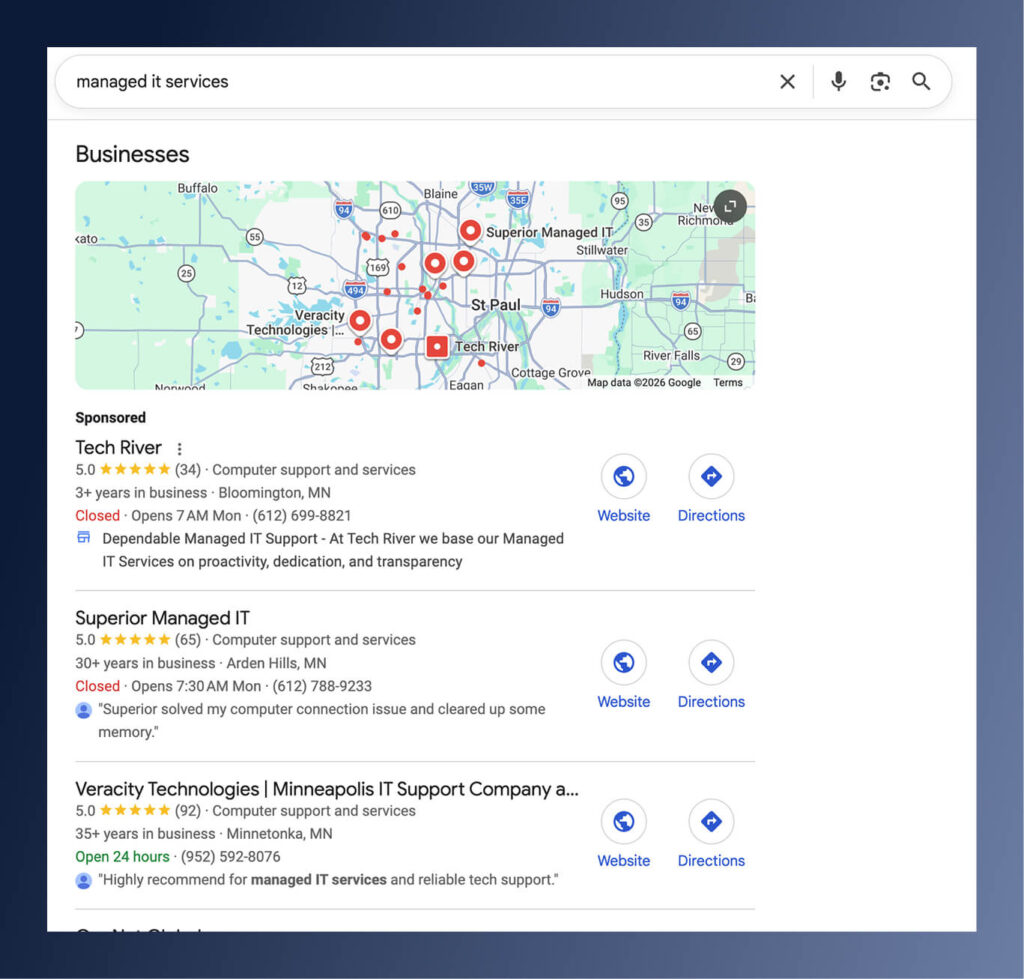
A Google Business Profile, formerly known as Google My Business, is a free listing that controls how your business shows up on Google Search and Google Maps and is one of the main assets for local search engine optimization. Your profile displays everything from your name and address to your hours, photos, services, and customer reviews, all within a prominent panel called the Local Pack. Think of it as your digital storefront on Google. It is often the very first thing a potential customer sees, and for many, it is the only thing they need to see before deciding to connect with your brand.
Why Is It Important to Optimize Your Google Business Profile?
Your Google Business Profile is one of the most important components of local SEO. In 2026, AI-driven search has reshaped how local discovery works. With Google’s AI Overviews and conversational search, users are now asking more complex, layered questions such as “Who is the best managed IT service provider for enterprise healthcare organizations?”
To be recommended in these experiences, your GBP must contain complete, well-structured information that AI systems can easily understand and trust. At the same time, organic search results are increasingly dominated by large, high authority platforms like Reddit, LinkedIn, and Wikipedia, making it more difficult for SMBs to compete through traditional SEO.
The Local Pack, however, has not been affected in the same way. This creates a unique opportunity for small businesses to gain meaningful search visibility through strong local SEO.
Google Business Profile Optimization Checklist for 2026
Google rewards profiles that show consistent activity, treating regular updates as a signal that your business is legitimate, engaged, and relevant to local searches. Everything in this Google Business Profile Optimization guide is designed to help you systematically optimize and manage your GBP.
Author Tip: Here’s a resource on how to set up your Google My Business Profile without a physical address.
Step 1: Claim and Verify Your Profile
Before any optimization can happen, you need to actually own your listing, and a surprising number of local businesses have never bothered to claim their Google Business Profile. Claiming your profile is the non-negotiable foundation of every Google business page optimization strategy. Skip it, and nothing else in this checklist matters.
How to claim it:
- Head to google.com/business and sign in with a business email, not your personal Gmail.
- Search for your business name. If it exists, click “Claim this business.” If it does not, click “Add your business to Google” and fill in your exact business name (matching your signage and legal documents), your precise address, primary category, phone number, and website.
- Complete verification. Google needs proof that you legitimately operate this business.
Verification options in 2026 include mail (a postcard with a code, usually 5 to 14 days), phone (instant SMS or call for eligible businesses), email (available for some service-area businesses), and video verification, where you record a short clip of your storefront and interior (Google added this as an expedited option in 2025).
One critical 2026 update worth highlighting: Google now enforces much stricter business name policies, so adding words like “best,” “#1,” or stuffing keywords into your business name will get you flagged and potentially suspended. Your name has to match your real-world signage exactly. No exceptions.
Step 2: Choose the Correct Primary Category
This is arguably the single most impactful thing you can control. Your primary category is the main signal Google uses to decide when to show your profile. According to BrightLocal, your category accounts for roughly 32% of the ranking weight for service relevance, making it by far the most important GBP ranking factor in your toolkit. Get it wrong, and you will struggle to rank for anything relevant, regardless of how much effort you put into the rest of your profile.
Choose your single most specific descriptor—“Computer support and services” beats “Computer service,” “Printer repair shop” beats “Computer shop.” Review the primary categories used by competitors who rank for your target keywords, and prioritize Google’s suggested categories, as they are informed by real search behavior.
Step 3: Choose Relevant Subcategories
Beyond your primary category, you can add up to nine secondary subcategories, and these give Google a much fuller picture of what you offer so you can surface in searches your primary category alone would miss. Be careful not to overstuff it. An IT service provider should use “Printer Repair Ship” only if it genuinely operates as one. Review your subcategories every quarter because Google frequently adds new options based on search trends, and being an early adopter of a newly available category can give you an edge before competitors catch on.
Step 4: Name, Address, Phone Consistency (NAP)
NAP consistency is one of those things that sounds simple but trips up an enormous number of businesses, especially ones that have been around for a while and have accumulated slightly different listings across dozens of directories over the years. Google cross-references your Name, Address, and Phone number across platforms like Yelp, Apple Maps, Bing Places, and others. If your phone number or address format differs on even a handful of sites, Google may conclude your business is unreliable.
What to check:
- Your name should be your exact legal or registered business name with zero variations, abbreviations, or added keywords.
- Your address needs to match postal records. No P.O. Boxes for storefronts.
- Use a local area code phone number as your primary line, not a toll-free 800 number.
- Your website link should go to a mobile-friendly site where the contact information matches your GBP exactly.
Run a NAP audit using a tool like BrightLocal’s Citation Tracker or just search your business name plus your city and see what comes up. Fix mismatches at the source (not just on your GBP) because consistency across the entire web is what reinforces your legitimacy in Google’s eyes.
Step 5: Optimize Your Business Description
You get 750 characters for your business description, and every one of them matters as this is the text that shows up directly below your business name in search results. A lot of businesses waste this space with vague, self-congratulatory copy like “Family-owned IT service provider established in 1992 in Plymouth, Minnesota.” That does not work anymore. What does work is specificity. Lead with concrete details. “Managed IT services and support for Minneapolis businesses, helping reduce cyber liability, implement modern cloud strategies, and eliminate IT downtime through fully managed IT services.” Naturally weave in a location reference, but do not force it. Google’s AI understands context now, so keyword stuffing in your description will hurt you more than help you, and a well-written description is a surprisingly effective piece of your overall Google Business Profile optimization strategy.
Step 6: Systematically Acquire New Reviews
Reviews are the lifeblood of local search. Profiles with strong review counts consistently earn more clicks, more trust, and higher placement in the Local Pack. If you are only getting reviews when someone randomly feels compelled to leave one on their own, you will fall behind competitors who have built a repeatable system. Do not leave this to chance.
Google cares more about review velocity (how fast you are gaining new reviews) than pure volume. If a competitor has 125 reviews and you have only 25, but you are acquiring new reviews at a rate 3 times theirs, Google sees your business as more relevant and more active, which can push you higher in local results despite the gap in total reviews. That is a huge opportunity for smaller businesses willing to put in the work.
Build a system around these principles:
- Ask at peak satisfaction moments, right after you have delivered a great outcome, and the customer is feeling good about the experience of your services.
- Make it dead simple by texting or emailing a direct link to your GBP review page.
- Train your frontline staff to know when and how to ask naturally.
Some businesses also set up automated workflows that trigger a review request when a support ticket closes with a positive satisfaction score, letting you capture momentum consistently without having to remember to send the email manually each time.
Step 7: Respond to Reviews
Collecting reviews is half the job. The other half is responding to them, and Google views your response rate as a trust signal. For positive reviews, thank the person by name and mention a specific point they raised. For negative reviews, acknowledge the issue, apologize, and take the conversation offline by offering a direct way to contact you.Never argue publicly. Never reveal customer details. Write every response as if a future customer is reading it. Because they likely will.
Step 8: Post Weekly Updates
Google’s 2026 algorithm puts serious weight on profile activity, and businesses that post weekly see higher visibility than profiles that go quiet for months at a time. Share operational updates like holiday hours, new team members, or service expansions. Every post should include a high-quality photo or short video, along with a clear call to action such as “Book now” or “Call today.” Keep the text under 150 characters for mobile readability, and clean up expired posts to avoid a neglected profile. We generally recommend that businesses batch-create a month’s worth of posts in a few hours using a design tool like Canva. GBP does not have native scheduling, but third-party tools can fill that gap.
Final Thoughts: Your GBP Is a Living Asset
Your Google Business Profile is not something you set up once and forget about. Your Google Business Profile is like any other marketing channel, so treat it accordingly. It needs a strategy and dedicated resources. For small businesses, your GBP provides a unique opportunity to build topical authority and outrank larger competitors in local SEO and capture high-intent customers at the exact moment they are searching for your services in your local market.