
Case Study
In the spring of 2025, we developed a Google Ads strategy for a Minneapolis-based managed service provider (MSP). The plan targeted accounting firms across the US and was paired with an MSP search engine optimization (SEO) strategy targeting nine other industries. To date, our MSP marketing strategy has contributed over $750K in qualified pipeline.
In this guide, we’ll walk through the step-by-step process we used to build and execute our MSP Google Ads strategy. By following these steps, your MSP can apply the same approach to achieve similar results.
How MSP Google Ads Management Turns Traffic Into Qualified Leads
Most MSPs think about Google Ads the wrong way. They think it’s about getting more clicks, more traffic, or just “being visible online.” But that’s not where the real value comes from.
Google Ads works because it captures existing demand, people who are already looking for an MSP like you. At any given time, there are businesses in your market actively searching for:
- “managed IT services near me”
- “IT support for small business”
- “cybersecurity company for accounting firms”
These prospects already know they have a problem and are actively looking for someone to solve it (often with cash in hand, ready to buy).
Google Ads simply puts your MSP in front of them at the exact moment they’re ready to take action.
This is what makes Google Ads so effective for MSPs. Most MSPs grow through referrals. And referrals work because the buyer already trusts the recommendation and is ready to move forward. Search behaves in a similar way. When someone is actively looking for IT support, they’re much closer to making a decision. That’s why these leads often close at a significantly higher rate than outbound or cold outreach.
But here’s the catch: Just running Google Ads isn’t enough. If your targeting is off, your messaging is too generic, or your offer doesn’t resonate, you’ll burn through budget without seeing meaningful results. That’s why the groundwork behind your campaign matters just as much as the campaign itself.
Google Ads for MSPs: Groundwork for an Effective Campaign
Identify Your Product-Market Fit
Most MSPs struggle to stand out.
When every provider offers “managed IT services,” “cybersecurity,” and “help desk support,” it’s easy to look the same as everyone else. And when that happens, the conversation quickly turns into a pricing discussion, which is a race you don’t want to compete in.
To avoid that, you need to get specific about whom you serve best and why.
For the Minneapolis-based MSP we mentioned earlier, we started by digging into their existing customer base. We reviewed sales calls, looked at past deals, and analyzed any data we could find on their clients.
This part isn’t glamorous, but it’s where the real insights come from.
One pattern stood out right away: About 20% of their clients were accounting firms.
That told us there was something about their service that resonated with that industry; we just needed to figure out what it was. So we went deeper. We researched conversations online (including Reddit) and found that accounting firms consistently struggled with two things:
- Reducing cybersecurity risk
- Maintaining productivity during the busy season
When we brought this back to the client, it clicked.
Their existing solution, built around cybersecurity tools and a cloud-based desktop environment, was already solving these exact problems, especially for hybrid teams dealing with clunky VPN setups. Instead of marketing to “any business that needs IT support,” we could position them as a provider that specifically understands and solves problems for accounting firms.
That clarity is what turns a generic MSP into a specialized one, and it’s the foundation for a Google Ads campaign that actually converts.
Define Your Target Audience
Geographic Constraints
For the best results, your MSP Google Ads strategy needs guardrails, and the first one is geography. It’s tempting to think, “We can support businesses anywhere. Everything is remote now.” And technically, that’s true. But not all high-intent leads are equal.
If a company in New York is evaluating MSPs and receives five proposals from local providers and one from out of state, who are they more likely to choose? In most cases, they’ll go with someone nearby.
Location still builds trust, and it impacts close rates.
Because of that, your geographic focus should reflect two things:
- Where you can realistically deliver great service
- Where you’re most likely to win deals
For most MSPs, that means focusing on a primary city or metro area. If you’re in a smaller market, you can expand to cover the entire state—but the goal is still the same: tight targeting that drives higher close rates.
Industry Focus
When you focus on a specific industry, your messaging gets sharper. Instead of saying “we provide IT support,” you’re speaking directly to the problems that matter to that audience. And when prospects feel like you understand their world, they’re far more likely to engage.
But the real advantage goes deeper: Industry focus allows you to expand your reach beyond your local market, without losing relevance.
That’s exactly what we did with the Minneapolis-based MSP in our example earlier. After identifying accounting firms as a strong segment, we didn’t limit the campaign to Minneapolis. We expanded it to target accounting firms nationwide.
Why?
Because the value wasn’t tied to location, it was tied to the problem they solved for that industry. Accounting firms in Texas have the same challenges as firms in Minnesota:
- Managing cybersecurity risk
- Supporting hybrid teams during busy season
Once your messaging is built around those problems, geography becomes less important. You’re no longer “a local MSP.”
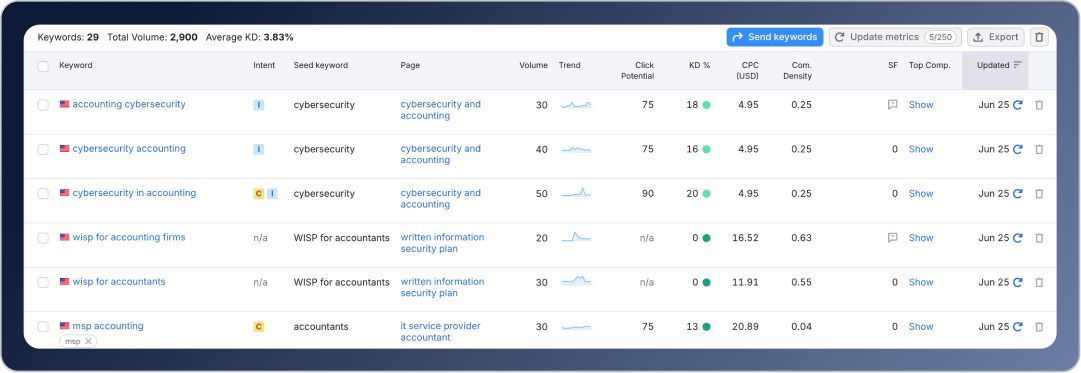
You’re a specialist for that industry. And the demand is there to support it. Roughly 2,900 people in the U.S. search each month for an MSP that specializes in helping accounting firms, more than enough to justify a national campaign.
The Takeaway:
-
If you’re a generalist → stay local to win deals
-
If you’re a specialist → you can expand nationally
The more specific your positioning, the wider your reach can be.
Create an Irresistible Offer
Think of Google Adwords as the fishing pole and your offer as the worm on the hook. If you have a fat, juicy, live worm, you will undoubtedly catch more fish than if you’re using a dirty, half-torn, plastic worm. The same is true for your MSP advertising strategy. The better the offer, the higher the conversion rate.
When possible, it’s great to have at least two offers: a middle-of-funnel offer (low-friction) and a bottom-of-funnel offer (high-friction). This way, you can convert inbound traffic regardless of where they are in their buying journey and improve your overall conversion rates.
Middle-of-Funnel Offers
For our client’s low-friction offer, we created an “Ultimate Guide to Cybersecurity for Accounting Firms.” This lead magnet was a professionally designed, high-quality, 12-page booklet covering everything a CPA or accounting firm needs to know about cybersecurity fundamentals and the FTC Safeguards Rule.
Instead of asking prospects to jump straight into a sales conversation, this gave them a simple way to engage, learn something valuable, and start building trust with the MSP.
Other examples of middle-of-funnel offers include:
- AI readiness guides
- IT buyer guides
- Compliance guides
- Case studies
- Industry reports
Bottom-of-Funnel Offers
In addition, we also created a high-friction offer for a free cybersecurity assessment. Prospects who accepted this offer had to interact with the MSP personally and share some of their company information, a significantly greater investment than simply downloading a guide. To make the offer more compelling, we later expanded this assessment to include a Level-1 penetration test, which we offered at no additional cost to qualified prospects.
This not only increased conversion rates but also ensured that the leads coming in were more qualified and closer to making a buying decision.
Other examples of bottom-of-funnel offers include:
-
IT assessments
- 1-hour of free remote support
- On-site cybersecurity training
- AI and automation workshops
7 Steps to Turn Your MSP Adwords Strategy Into Revenue
Now that you’ve identified who you’re targeting and where you’re focusing, you’re ready to start building your campaign. But before you launch anything, it’s important to get the fundamentals right. Google Ads can deliver strong returns, but only if the campaign is structured properly from the start. The steps below will help you build a campaign that’s designed to drive qualified leads and limit wasted ad spend.
Step 1: Establish a Budget for Your Campaign
To set your campaign up for success, start with the end in mind. Before you spend a dollar, answer three questions:
-
What is a new customer worth to your business?
-
How much are you willing to spend to acquire one?
-
How many new customers do you need, and by when?
These answers define the economics of your campaign and set a realistic budget for this marketing channel. Your exact numbers will vary, but the following is an example of how to determine your Google Ads budget.
If your average client pays $2,000 per month and stays for three years, the lifetime value of a customer is $72,000.
For most IT service providers, a healthy customer acquisition cost is around 25% of first-year revenue. In this case, that means you should be comfortable spending roughly $6,000 in advertising to acquire a new client.
Now work backward.
If your business closes 20% of qualified leads, you can afford to spend $1,200 per qualified lead and still hit your target.
Most MSP Google Ads campaigns see an average cost per click (CPC) of about $20. At that rate, your campaign needs to generate a qualified lead in fewer than 60 clicks, which translates to a 1.5% conversion rate (clicks to new contact).
Defining these numbers up front gives you clear benchmarks. As the campaign runs, you can quickly see what’s working, what isn’t, and where adjustments are needed to stay profitable. If your goal is to close $20K in net new monthly recurring revenue from Google Ads in 12 months, you need to spend $60K on your advertising campaign. This translates to $5,000 per month, or a daily budget of about $167.
Step 2: Set Your Campaign Objective and Campaign Type
Now that your budget is clearly defined, you’re ready to create your campaign.
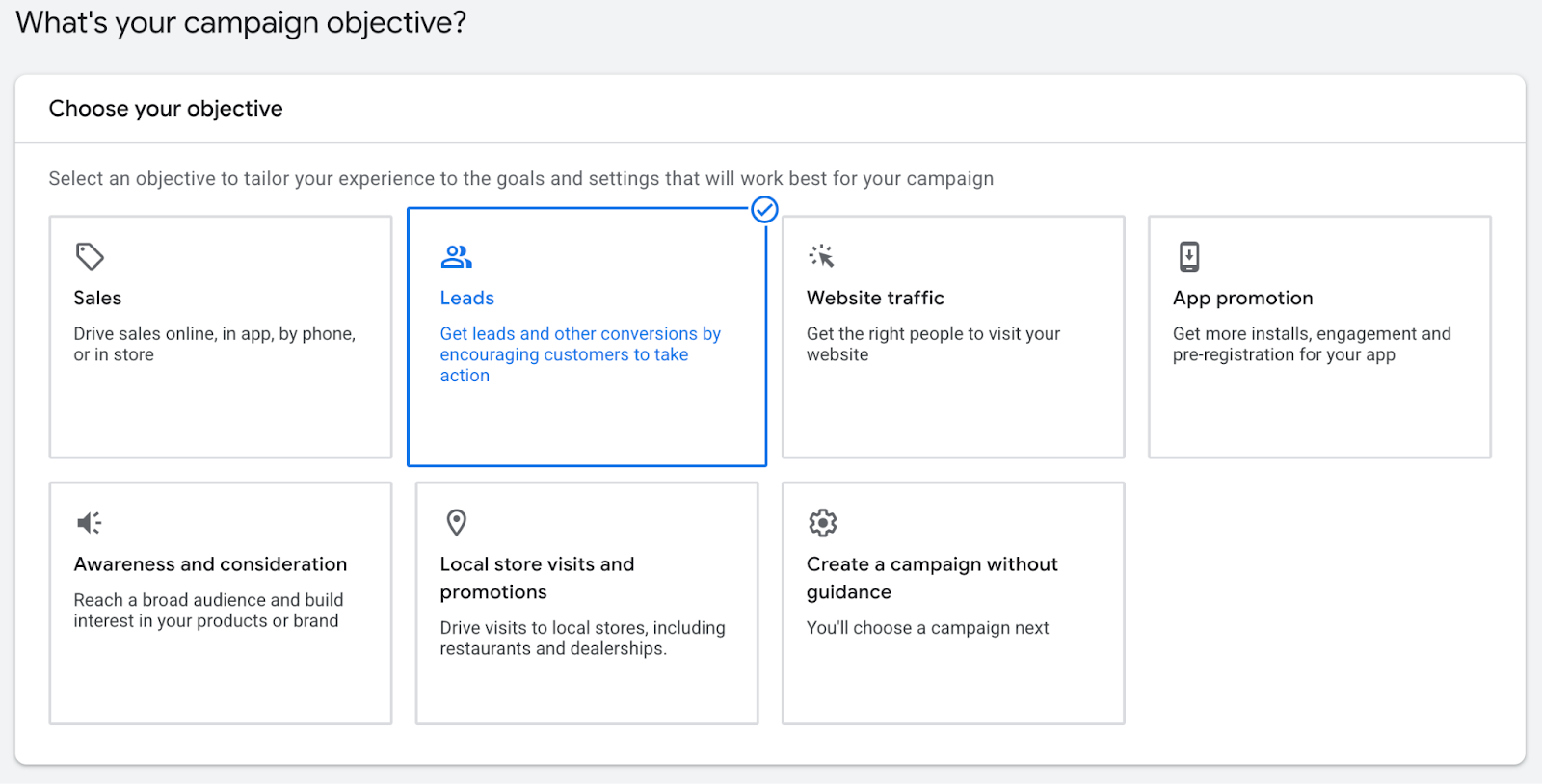
Google Ads offers several types of campaign objectives, such as Sales, Website traffic, and so forth. When creating your campaign, we recommend choosing the Leads objective.
Campaign Types
Google Ads offers several campaign types, but not all of them are a good fit for selling IT services, especially when your goal is to generate qualified leads through PPC.
Here’s a quick overview of the main options:
Search
Text-based PPC ads that appear when someone searches for specific keywords.
Performance Max
AI-driven campaigns that run across all Google channels to maximize conversions.
Demand Gen
Image and video ads designed to generate and capture demand across YouTube, Google Discover, and Google Display.
Video
Video ads that run on YouTube to drive awareness, consideration, or conversions.
Display
Visual ads shown across millions of websites and apps, typically used for awareness or retargeting.
Shopping
Product ads pulled from Google Merchant Center that appear in Google Shopping and Search results.
For most MSPs, especially those just getting started with PPC, Search campaigns are the best place to begin. They give you the most control over targeting, keywords, and spend. More importantly, they allow you to capture high-intent prospects who are actively searching for IT services. That’s what makes Search the most predictable and effective form of PPC for MSPs. You’re not interrupting someone mid-scroll, you’re showing up exactly when they’re looking for help.
Additional Campaign Configuration
Below are the additional campaign settings we recommend for MSP Google Ads campaigns:
Bidding Focus
Set your focus to Clicks. This gives you control early on while Google collects data. Enable a maximum CPC bid limit and set it to $20. This helps prevent overspending while the campaign stabilizes.
Networks
Turn off Google Search Partners Network.
Turn off Google Display Network.
These networks often drive low-quality traffic for MSP campaigns and are better excluded at the start.
Location targeting
Set your location based on the geographic constraints you defined earlier. In our case study, the campaign targeted the entire United States. For most MSPs, however, we recommend focusing on the primary city or metro area you actually serve. Tighter targeting typically results in higher-quality leads.
Final URL
Add your destination URL. For now, use your website’s homepage. In Step 6, you’ll create a dedicated landing page designed specifically for your campaign.
Step 3: Research Keywords and Define Ad Groups
Ad Groups and How They Relate to Keyword Research
Next, conduct keyword research and organize related keywords into ad groups. Think of ad groups as categories that group keywords with the same or very similar search intent.
For example, keywords that include “managed IT” or “managed IT services” belong in one ad group. Keywords such as “cybersecurity consultants” or “managed cybersecurity” should be placed in a separate ad group. While these services are often sold together, Google treats them very differently. Each group reflects a distinct search intent, and mixing them typically leads to weaker ad relevance and higher costs.
Keeping ad groups tightly focused allows you to write more relevant ads, improve your Google Ads Quality Score, and control costs more effectively.
For example, when our Minneapolis client decided to target accounting firms, we used keywords such as:
- Managed IT support for accounting firms
- Managed IT for CPA firms
- Managed IT for accountants
- IT support for accountants
- IT support for CPAs
- IT help desk for CPA firms
Once you’ve built your keyword list, export it to a Google Sheet for easy organization and review. Then return to your campaign and create an ad group using the keywords you identified. Repeat this process for each keyword category, creating as many ad groups as needed to keep keywords tightly grouped by intent.
Well-structured ad groups make it easier to write relevant ads, improve performance, and control costs as the campaign scales.
Step 4: Develop a Budget and Choose a Bidding Strategy
When it comes to bidding, you generally have two options: automated bidding or manual bidding. Based on our experience with MSP Adwords management, manual bidding is the most cost-effective approach in the majority of cases. Manual bidding gives you direct control over CPC, allowing you to increase bids on keywords that convert better or consistently drive higher monthly recurring revenue.
For example, companies searching for co-managed IT services are typically larger organizations with an existing internal IT team. That usually translates to higher seat counts and larger contract values. With manual bidding, you can prioritize these higher-value keywords and ensure your MSP appears in top positions for co-managed IT searches, rather than letting Google automatically distribute spend across lower-value traffic.
Step 5: Create a Scroll-stopping Ad
Creating an effective ad requires relevance and clarity at every level. Each element of the ad, along with the landing page it points to, should align closely with the searcher’s intent.
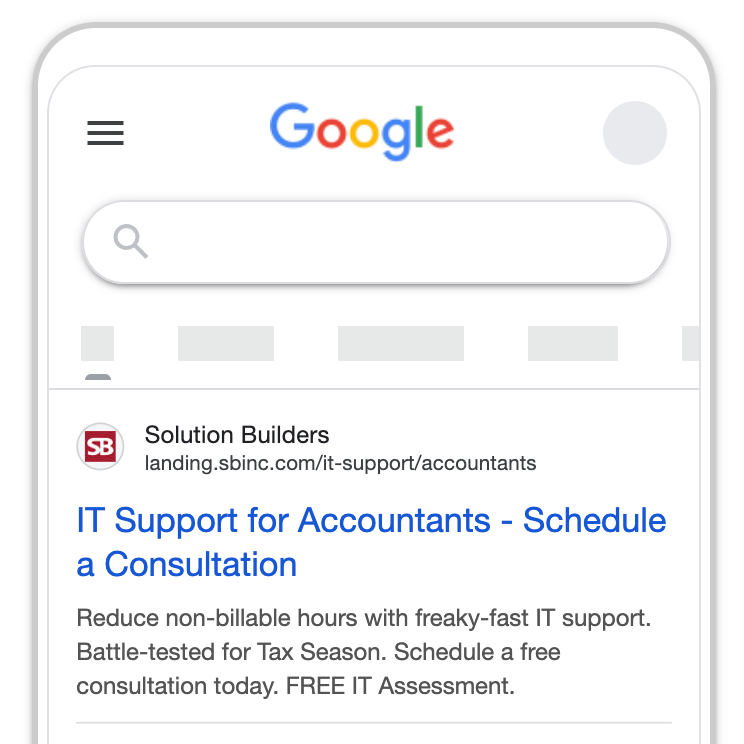
For our client’s campaign, “IT support for accountants” had the highest search volume, making it the primary keyword. We placed “IT Support for Accountants” in Headline 1 to clearly signal to both the searcher and Google that the ad directly matched their search. Headline 2 included a clear call to action to encourage clicks through to the landing page.
The ad copy focused on pain points that resonate strongly with accounting firms, such as non-billable hours and lost productivity caused by poorly managed IT. These challenges are well understood within the accounting industry, so we reinforced them consistently across both the ad copy and the landing page to maintain message alignment and relevance.
Create a List of Keywords and Assign Them to Ad Groups
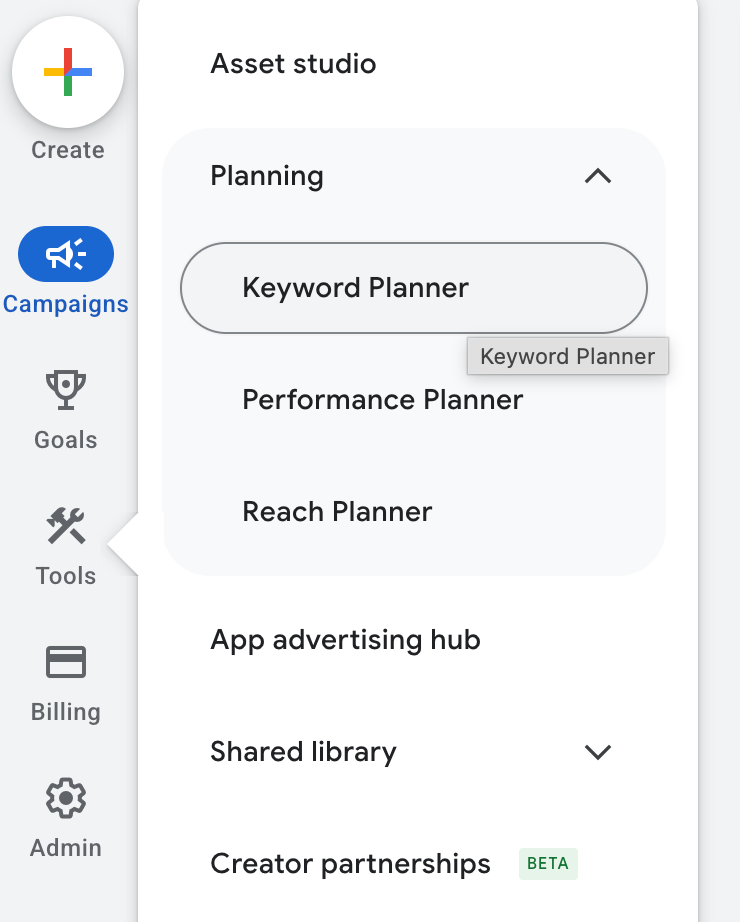
Navigate within your Google Ads account to Tools and select Keyword Planner. Use this tool to research keywords, review estimated search volume, and understand the expected CPC for each query.
If you specialize in a specific industry, we recommend combining industry-specific terms with your core service keywords. This often attracts higher-intent prospects and reduces wasted spend.
Step 6: Build a High-Converting Landing Page
In general, the most effective way to maximize lead generation from an MSP Google Ads campaign is to send traffic to a dedicated landing page. This can be a modified version of your homepage or a page tailored specifically to the offer and audience you’re targeting.
As a best practice, we recommend using a simple, distraction-free header on the landing page. This keeps visitors focused on the message and the primary call to action.
Your primary keyword should also be included in the page title, H1, meta description, and within the first 100 words of copy. This alignment helps improve landing page relevance and contributes to a stronger landing page performance within Google Ads.
Step 7: Launch Your Campaign
After you launch your campaign, let it run for 48 hours. At that point, it’s important to adjust CPC bids manually until raising them further starts to yield diminishing returns on clicks and impressions. Bid management is an ongoing, iterative process that requires close coordination between marketing and sales to understand both the quality and volume of leads the campaign is producing.
After-launch Routines
Once your campaign is live, it’s essential to actively monitor performance and have clear processes in place for handling new leads. Effective ongoing MSP AdWords management depends on two core routines: continuous optimization and thoughtful lead nurturing.
Follow-up Step A: Optimize Campaign Performance
If you don’t have Microsoft Clarity installed on your website, add it now. It’s a free tool that provides invaluable insight as to what your site’s traffic is doing: where they click, how much time they spend on different parts of your site, and so on.
Follow-up Step B: Nurture Inbound Leads to Lock In Sales
A prospect needs to know, like, and trust you before they are ready to buy. Every lead, regardless of the offer they converted on, was enrolled in two different workflows in HubSpot.
The first workflow included seven marketing emails focused on cybersecurity best practices for accounting firms. Each email contained a hot tip from the “Ultimate Guide” lead magnet and included a cybersecurity offer at the bottom.
The second workflow was to follow up with the lead using a direct one-to-one email sequence from an account executive. For leads who downloaded the gated asset, this workflow focused on asking about cybersecurity initiatives and further investigating whether they had any questions about the content in the free guide.
Leads who requested to book a meeting were enrolled in a similar follow-up sequence, but these meetings were scheduled with a sales representative. We advised the sales reps to call every inbound lead who requested a meeting within an hour of converting. We later adjusted this process by adding a self-scheduling link to the bottom-of-funnel form. This gave the sales reps some leeway and helped prevent leads from falling through the cracks.
Later in the campaign, we added a third workflow that sent a social media connection request and a message to the lead via LinkedIn automation. This provided an additional point of contact.
Results from Successful MSP Adwords Management
After three months, the campaign generated 25 leads and $32,000 in the pipeline. Across Google and LinkedIn, our client spent $4,000 in advertising, which means that for every $1 of ad spend, $8 of pipeline was generated.
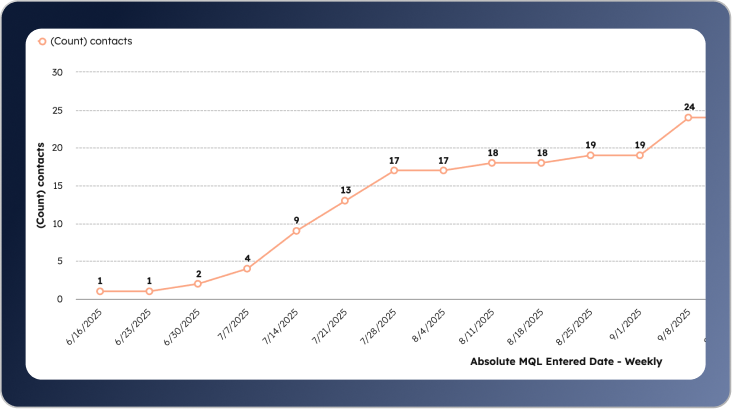
The trade-off of running an industry-focused campaign is that performance will naturally follow the seasonal rhythms of that industry. For example, accounting and CPA firms are notoriously difficult to reach at year-end and throughout the spring tax season, when attention is almost entirely on client work.
As a general rule, it’s usually better not to shut a campaign off entirely during these slower periods. Instead, reduce bids and scale back spending so you remain visible without forcing performance that doesn’t align with current industry activity.
Final Thoughts for IT Service Providers
There are over 40,000 MSPs in the US. The market is noisy and highly competitive. As an MSP, your secret weapon is marketing. Most MSPs aren’t good at it. The search landscape for IT services is fairly uncompetitive. With the right strategy and a healthy investment, your MSP can dominate your market and generate hundreds of qualified leads through organic and paid search. I have witnessed, first-hand, search engine marketing change the lives of business owners. The opportunity is there. Are you willing to capitalize on it?
Too dramatic? Maybe. But it’s true. This stuff works. If you have any questions or want me to personally audit your market and develop a strategy you can use to dominate your competition, let me know. I am here to help. And I LOVE helping others win.